
Most WordPress fleets are secured one site at a time. A security plugin goes onto each new install, gets its own license and settings, and runs inside PHP on every request.
A secure WordPress hosting server works in a different order. It decides whether a request reaches PHP at all, and only then does the plugin get a look.
WordPress security should be infrastructure first and application second. The order matters because each control can only act on what has reached its stage of the request path.
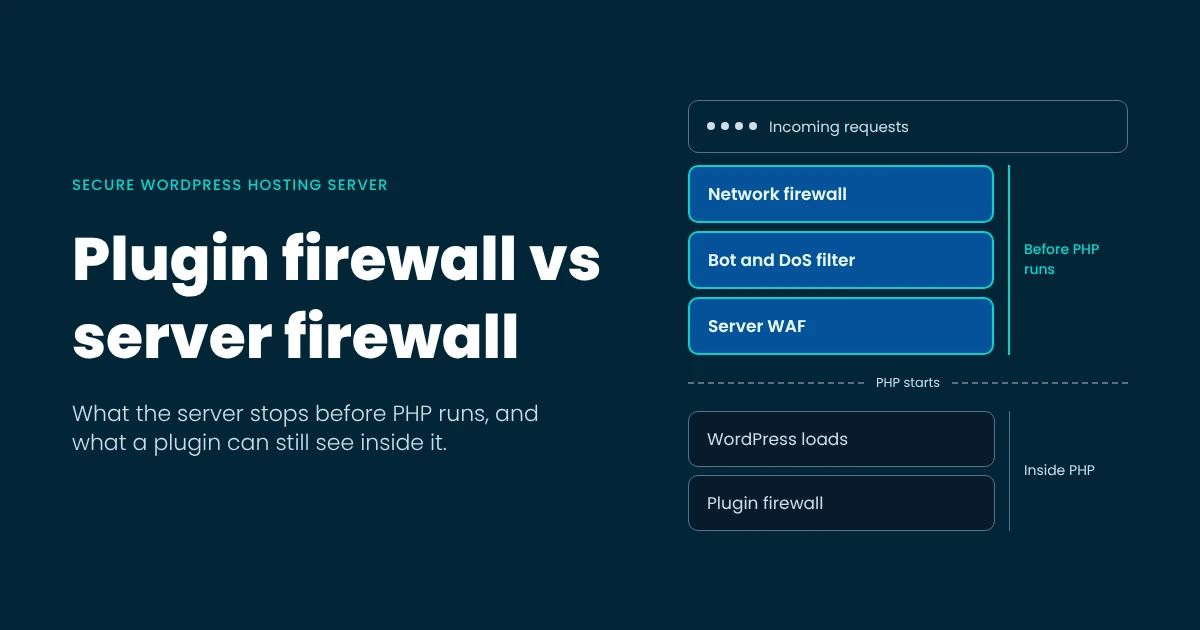
A server firewall sees the request before PHP starts. A plugin firewall sees it after WordPress has loaded.
That order changes the job for everyone who touches the server. A hosting provider sets what web hosting security covers on every account before the first site goes live. An agency running its own VPS can stop repeating that work site by site. A site owner keeps a short list that nobody else can do for them.
Each of those jobs depends on whether a request is stopped before PHP starts or after WordPress has loaded.
WordPress’s own hardening guide draws the same line: plugin firewalls “filter attacks as WordPress is loading,” while a server WAF filters “before it is processed by WordPress.”
On an Imunify360 server, the network firewall blocks known attacker IPs using attack data shared across the Imunify threat intelligence network of 65M+ domains.
WebShield, the anti-bot and DoS filter in front of the web server, gives suspicious visitors an invisible JavaScript challenge instead of a CAPTCHA.
The server-level WAF runs on ModSecurity, and it is where the server-side rules of WAF for WordPress are enforced.
The network firewall, WebShield, and server WAF (the three highlighted boxes) all run before PHP starts. The plugin firewall comes later, after the PHP process and the WordPress bootstrap, as the first check inside the application.
WordPress’s hardening guide stops at that ordering. On a server with many sites, that order has three consequences:
- A rejected request costs no PHP worker. It never spawns a PHP process or loads wp-load.php.
- Pre-authentication exploits stop early. An exploit aimed at a vulnerable plugin endpoint is dropped before any plugin code runs.
- Requests outside WordPress are covered too. Probes for .env files, .git metadata, and credential files are filtered even though WordPress never routes them.
During the September 2026 credential-file scan, scanners went looking for the login files of AI coding tools on web servers. Imunify360’s WAF rules for those paths blocked 7.3 million requests on nearly 48,000 servers between going live and 30 September 2026.
Those are not WordPress URLs, so a plugin firewall would never have been consulted about them.
Server-level WordPress security catches them because it filters every request to the server.
What a security plugin can see from inside PHP
A security plugin sees each request after WordPress has loaded, with full knowledge of users, roles, nonces, and the database. That context makes WordPress security plugins good at login hardening, two-factor authentication (2FA), file-integrity checks, and rules tuned to one site.
A server firewall has no view of who is logged in or which role they hold.
The same position sets the plugin’s limits:
- Every inspected request has already cost a worker. The plugin runs inside the PHP process it protects, so the request has reached application code before the plugin can judge it.
- Floods still burn CPU. A flood of requests to xmlrpc.php or wp-login.php each loads WordPress before the plugin rejects them.
- It sees one site. On a shared server, the neighbouring account is outside its view.
- It covers only where it is installed. The staging copy, the forgotten subdomain, and the non-WordPress app get nothing.
That makes the plugin the second layer for securing WordPress, where its knowledge of users and roles does work a server firewall cannot.
On an Imunify360 server, the Imunify Security plugin for WordPress holds that site-level role. It also delivers the WAF for WordPress rules that need application context, so the site-level layer arrives with the server-level one.
Per-site install vs server-wide protection
A plugin protects the sites it is installed on. A server-level layer protects every account on the server, including the ones nobody is maintaining. That is the main limit of plugin-based WordPress hosting security on a shared server.
For hosting providers, Imunify360 is managed server-wide from the control panel (cPanel, Plesk, CyberPanel, Webuzo, AdminBolt, or DirectAdmin), so every account on the plan is covered, including one created tomorrow.
Site owners can keep per-site control over WAF rules through the Imunify Security plugin for WordPress, which is installed on more than 1.3 million websites. WAF for WordPress has been on by default since August 2026 for every site running that plugin on an Imunify360 server. It blocks exploits against vulnerable plugins, themes, and core before the customer updates, which is the gap behind the top security challenge for 53% of providers: outdated or vulnerable software (Web Hosting Trends Report 2026).
For agencies running their own servers, updates are the problem. Plugin and theme updates are the top security challenge for 65% of agencies, and for 75% of those with 100+ sites. At that size, 45% still update by hand, one site at a time (State of WordPress Agencies 2026). A server-wide WAF is protection that does not wait for the update, and it needs no per-site plugin to install, license, or configure across 80 client sites.
The two layers work together. Depending on the vulnerability, a WAF for WordPress rule may go to the server WAF, the plugin, or both. The plugin delivers the site-level rules. It is part of the same hosting security stack, so there is no second product to buy.
Resource overhead: what each request costs
A request rejected before PHP costs the server very little.
A request inspected inside PHP has already cost a worker, which is why plugin-only security scales badly on a shared server. Of all Linux web server security best practices, filtering early is the one that pays back in capacity.
Most of what gets rejected is automated. Automated traffic made up more than 53% of all web traffic in 2025, and 36% of providers name resource-eating bots as a security overhead. Every one of those requests that reaches a plugin firewall first loads PHP and WordPress.
One agency saw the difference on its own servers. Foxtrot Media, which runs hundreds of client sites on servers it manages itself, blocked 1.5 million bot requests to a single client blog in one month with Imunify360, and its server CPU load fell 60% overnight.
On the server side, Low Resource Mode runs Imunify360 in around 100 MB of RAM, suitable for a 1 GB VPS. RapidScan uses caching and hash validation to skip clean files, and CloudAV moves heavy analysis off the server.
Isolation: the layer that matters when prevention fails
A secure WordPress hosting server assumes one site will eventually be compromised, and makes sure it stays the only one.
CloudLinux and KernelCare close the routes an attacker would take next, in the order they would take them:
- CageFS, a virtualized filesystem that isolates each hosting account, locks the account into its own environment. It sees only its own files and a limited system view, and cannot tell other accounts exist.
- SecureLinks, kernel-level symlink protection, blocks users from creating or following symlinks to files they do not own. That closes the classic route to a neighbour’s wp-config.php, and it needs no configuration.
- Isolates (beta) moves the boundary from the account to the website. Each site gets its own isolated filesystem, its own PHP version, and its own resource limits, so two client sites under one account stay apart.
- KernelCare patches the running kernel without a reboot. On a multi-tenant server, an unpatched kernel can allow one compromised account to escalate to root and reach every other account’s files, databases, and mail. Live patching applies the fix as soon as it is available, and KernelCare is included with Imunify360.
One more control covers the sites that cannot move forward. HardenedPHP backports security patches to end-of-life PHP versions, so a legacy site keeps the exact PHP version it needs with known CVEs patched.
For a hosting provider, the outcome is containment. The compromise stays in one account, and the other customers on the server keep their data and their uptime. For an agency, each client’s files and database stay inside that client’s own boundary. Read more about CageFS, the virtualized filesystem that isolates each account.
The decision table: what a secure WordPress hosting server looks like
Audit your WordPress hosting server against this table. Each row is a control, where in the stack it runs, how much of it a plugin firewall can cover, which server-level component covers it on CloudLinux plus Imunify360, and who owns it.
| Control | Where it runs | Plugin firewall | Server-level layer | Owner |
|---|---|---|---|---|
| Known-attacker IP blocking | Before PHP | Partial | Network firewall (Imunify threat intelligence) | Host |
| Bot and DoS challenge | Before PHP | Partial | WebShield | Host |
| WAF rules for SQL injection, XSS, and exploits | Before PHP | Partial | Server-level WAF (ModSecurity) | Host |
| Virtual patching for plugins, themes, and core | Before and inside PHP | Partial | WAF for WordPress | Host |
| Requests for .env, .git, and credential files | Before PHP | No | Server-level WAF | Host |
| Brute force on wp-login.php | Before and inside PHP | Yes | WebShield, network firewall | Host, site owner |
| Brute force on FTP, SSH, and mail | Server services | No | IDS/IPS | Host |
| Malware in files | Filesystem | Partial | Real-time malware scanning | Host |
| Malware in the database and cron | Filesystem and database | Partial | Malware Database Scanner, cron scanning | Host |
| Zero-day PHP scripts, judged by behaviour | Inside PHP, server-wide | No | Proactive Defense (RASP), blocking in Kill Mode | Host |
| Cleanup and compromised-password reset | Filesystem and accounts | Partial | Automated cleanup, password reset | Host |
| Account isolation | Kernel and filesystem | No | CageFS | Host |
| Per-site isolation | Kernel and filesystem | No | Isolates (beta) | Host, agency |
| Symlink protection | Kernel | No | SecureLinks | Host |
| Kernel patching without reboot | Kernel | No | KernelCare | Host |
| Patches for end-of-life PHP | PHP runtime | No | HardenedPHP | Host |
| Login hardening and 2FA | Inside PHP | Yes | Control panel 2FA for the account | Site owner |
| Per-site file-integrity checks | Inside PHP | Yes | Real-time scanning of changed files | Site owner |
| Plugin, theme, and core updates | Application | No | WAF for WordPress covers the gap until update | Site owner, agency |
Proactive Defense, the real-time PHP analysis engine, judges scripts by what they do as they run. It runs in Log Only mode by default and blocks once set to Kill Mode. The plugin column marks what a plugin firewall can do from inside one site; “Partial” means it acts after PHP has loaded, or only on its own site.
For readers mapping this to PCI DSS: the WAF and account isolation rows correspond to common requirements, but confirm scope with your assessor. For component depth, see the full WAF for WordPress feature detail.
Who owns which layer: host, agency, site owner
Web hosting security is split between three owners, and each controls a different part of the stack.
- A secure WordPress host owns everything below PHP.
- The site owner owns what only they can change inside WordPress.
- A self-managed agency owns the host’s column on its own servers, plus the portfolio work in between.
| Host | Agency (self-managed servers) | Site owner |
|---|---|---|
| Kernel patching | The host’s column, on its own VPS or dedicated servers | WordPress core, plugin, and theme updates |
| Web server and WAF | Least-privilege access for staff and contractors | Strong admin credentials and 2FA |
| Account and site isolation | Credential rotation when a client leaves | Removing unused plugins and themes |
| Malware scanning and cleanup | Staging environments and restore tests | Installing only from trusted sources |
| Backups | Plugin hygiene across the portfolio | Keeping credentials out of the web root |
| Control panel 2FA |
The split matters most at handover. When an agency hands a site to a client, the right column moves with it, and the client needs to know that.
WordPress’s own hardening guide.
VPS WordPress hosting: the same stack, one layer up
A VPS gives WordPress more isolation from other tenants, but on its own it adds no security controls. What it changes is who runs the layers a shared host used to run: the provider on a managed plan, or the agency on a self-managed one.
For hosting providers, this is where stacks drift. Managing security risks and DDoS is the second-biggest VPS challenge for 37% of providers, and 29% struggle to keep one consistent stack across shared and VPS. Some providers saw customers who upgraded from shared to VPS end up with weaker protection, because the VPS lacked the shared server’s tooling.
The VPS Bundle closes that gap: CloudLinux and Imunify360 for managed VPS plans, partner-only, at up to 55% off standard licensing, with products identical to the standalone versions.
HostArmada reported a 70 to 80% drop in hacked-website support tickets on VPS after deploying Imunify360. Enterprise WordPress security hosting uses the same split, with the host running the server layers on every node and site teams keeping the application layer.
For agencies on their own VPS, run CloudLinux and Imunify360 on one client server first, check what it blocks, and roll it out across the portfolio once it has proven itself.
Frequently asked questions
Do I need a security plugin if my host has a WAF?
It depends on what you want the plugin to do. The server WAF handles half of the job that happens before PHP runs. Keep a plugin if you value its login hardening, 2FA, and per-site integrity checks. On an Imunify360 server, the Imunify Security plugin for WordPress already delivers site-level WAF rules, so a second firewall plugin mostly duplicates work.
Does a security plugin slow down a WordPress site?
It adds work to every request it inspects, because it runs inside PHP after WordPress loads. On a quiet site, that cost is small. Under heavy bot traffic, each rejected request still loads PHP and WordPress first, so the cost grows with the attack. Filtering at the server removes that work before PHP starts.
Not by default. A VPS separates you from other tenants at the virtual machine level, but it ships with none of the WAF, scanning, or isolation a well-run shared server provides. It moves responsibility for those layers to whoever manages the VPS. A managed VPS with the same stack as shared hosting closes that gap.
Is Cloudflare enough to secure WordPress?
An edge service such as Cloudflare filters traffic before it reaches your server, which helps with DoS and bad bots. It cannot see or fix what is on the server itself: malware in files, the database, or cron, cross-account access, or an unpatched kernel. Edge filtering pairs well with on-server security, because each covers a different part of the path.
What does server-level WordPress security mean?
Server-level WordPress security is protection that runs on the hosting server rather than inside each WordPress install. It filters requests before PHP runs, scans files and databases across every account, isolates accounts and sites from each other, and patches the kernel and PHP underneath. It covers every site on the server, whether or not anyone installed a plugin.
Where to start
A security plugin can only inspect a request after PHP has already started handling it. The server’s firewall decides whether PHP runs at all.


